Talk anywhere you can type.
Hold Right ⌥, say what you mean, let go. A speech balloon at your cursor shows the words as they arrive, then Utter types tidy text right there — using Apple’s on-device speech model, so your voice never leaves your Mac.
Pay once · macOS 14+ · Apple silicon & Intel · ~4 MB download · Already bought? Download Utter
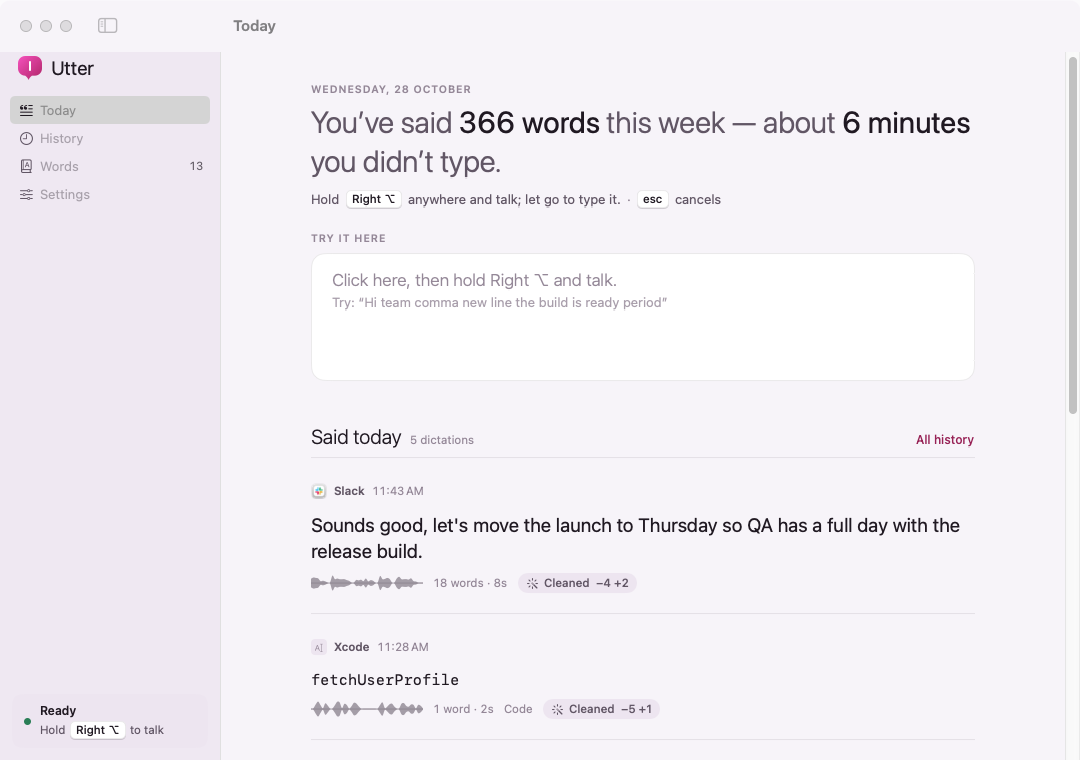
A working model, not a video — sample data. There’s no microphone here: holding the key “hears” the phrase you pick, word by word, and the same clean-up rules as the app tidy it. The real Utter listens to you, on your Mac.
- Pay once, no subscription
- No account
- Speech recognised on your Mac
- Native on Apple silicon & Intel
- 14-day refund
Faster than typing. Quieter than the cloud.
Utter lives in your menu bar and works in any text field — email, chat, docs, terminals and code editors.
Hold, talk, let go
Hold Right ⌥ — or Right ⌘, Right ⌃ or fn — while you speak. Prefer hands-free? Switch to a start/stop shortcut such as ⌃⌥Space. Esc cancels.
A balloon at your cursor
Your words appear in a speech balloon pointing at the spot they’ll land, with a dot that moves with your voice. A tick when they’re typed, then it’s gone.
Tidied for you
Ums and uhs disappear, sentences get capitals, and you can say “new line”, “new paragraph”, “comma” or “period”. Or pick Raw for exactly what was heard.
A mode for code
Say “camel case user name” and get userName — snake, pascal, kebab and constant case too, plus “dot”, “underscore”, “open paren” and “equals”.
Your words
Teach it that “next js” means Next.js and “cube control” means kubectl, and add names and jargon as hints for the recogniser. They apply in every mode.
A journal of what you said
Every dictation lands as a quote with its voiceprint, the app it went to, and what clean-up changed. Search it, copy it, insert it again, or turn it off.
Clipboard-safe
Text is pasted for you and your previous clipboard is put back a moment later. Without Accessibility, it’s copied and the balloon says “⌘V to paste”.
The time you save
The Today screen tells you how many words you’ve said this week and roughly how many minutes of typing that saved.
Your language
Pick from every language your Mac can recognise on-device. Utter only lists the ones that stay offline.
Prose, word for word, or code.
Switch from the menu bar. Your words apply in all of them.
- Clean
- “um so the build is ready comma uh can you test it new line thanks”So the build is ready, can you test it
Thanks - Code
- “let camel case retry count end equals snake case max retries”
let retryCount = max_retries - Raw
- “um so the build is ready”um so the build is ready


Every screen, light and dark.
Screenshots straight from Utter, with sample dictations. Flip between light and dark.


What stays. What connects.
Utter only uses Apple’s on-device recognition and won’t run a language that would need a server.
Stays on your Mac
Your voice, and everything you said.
- ✓Your voiceHeard only while you hold the key, recognised on your Mac, never saved
- ✓Your dictation journalText, app name and a loudness outline — not a recording. You can turn it off
- ✓Your wordsSwaps and names, kept next to the journal
- ✓How you use itNo analytics or tracking in the app
Connects
Two small requests, over HTTPS.
- 1License checkYour key and an activation ID, to Dodo Payments
- 2Update checkApp name and version, to
utter.newmac.app
The full list, for every app, is in the privacy policy.
Pay once. Keep it.
One payment, no subscription. Choose how many Macs you’ll use Utter on.
3 Macs
For your home and work Macs
Checkout opens soon. The buttons above go live here the moment it does.
Every plan includes
- One payment, no subscriptionEvery feature, yours to keep.
- License key by emailSent the moment you pay. Activate in one click.
- Move between MacsUse “Deactivate this Mac”, then activate on the new one.
- Free updatesNew versions install themselves.
- 14-day refundNot for you? Read the refund policy.
- macOS 14 or laterNative on Apple silicon & Intel.
Already bought? Download Utter · .zip · Install help
Questions, answered.
Does anything I say leave my Mac?
No. Utter asks Apple’s speech framework for on-device recognition only and refuses to run a language that would need a server. Audio is never saved. Your journal and your words are files in your Library folder. The app only goes online to check your license with Dodo Payments and to check this site for updates — see the privacy policy.
Which languages work?
Whatever your Mac can recognise offline. Settings lists only those languages; macOS may need to download a language’s speech model first, which you can do in System Settings › Keyboard › Dictation.
Why does it ask for Accessibility?
It lets Utter notice the key while another app is in front, find your cursor and paste for you. Without it, use the start/stop shortcut and Utter copies the text so you can press ⌘V yourself.
Will it overwrite what’s on my clipboard?
Only for a moment. Utter puts your previous clipboard back right after pasting. You can turn that off in Settings.
Is it as accurate as cloud dictation?
Apple’s on-device model is very good for everyday speech. For names and technical terms, add them on the Words screen — names to listen for and “sounds like” swaps make a big difference.
macOS says it can’t verify the developer.
Utter is distributed directly from this website. Here’s how to open it the first time.
Is there a free trial?
No. Use the working model at the top of this page, or watch the demo video, to see exactly how Utter works. If it turns out not to be for you, you can ask for a refund within 14 days — see the refund policy.
Can I use Utter on more than one Mac?
Yes. The 3-Mac and 5-Mac plans cover several Macs with one license key. Any license can move to a new Mac: choose “Deactivate this Mac” in Utter on the old one, then activate on the new one.
Comparing dictation apps for Mac? Read the guide.
Say it once. It’s typed.
Private, offline, and ready the moment you hold the key.